
If you’ve ever tried to place ads “after the 2nd paragraph” (and again after the 5th, and maybe the 9th), you know how quickly it turns into a mess. You either start editing posts by hand, sprinkling shortcodes everywhere, or you end up hacking your theme… which promptly breaks the next time you change themes. The goal is simple: you set the rules once, and WordPress handles the rest. No more manually maintaining ad placements across dozens of posts, and no more theme changes wiping out your setup.
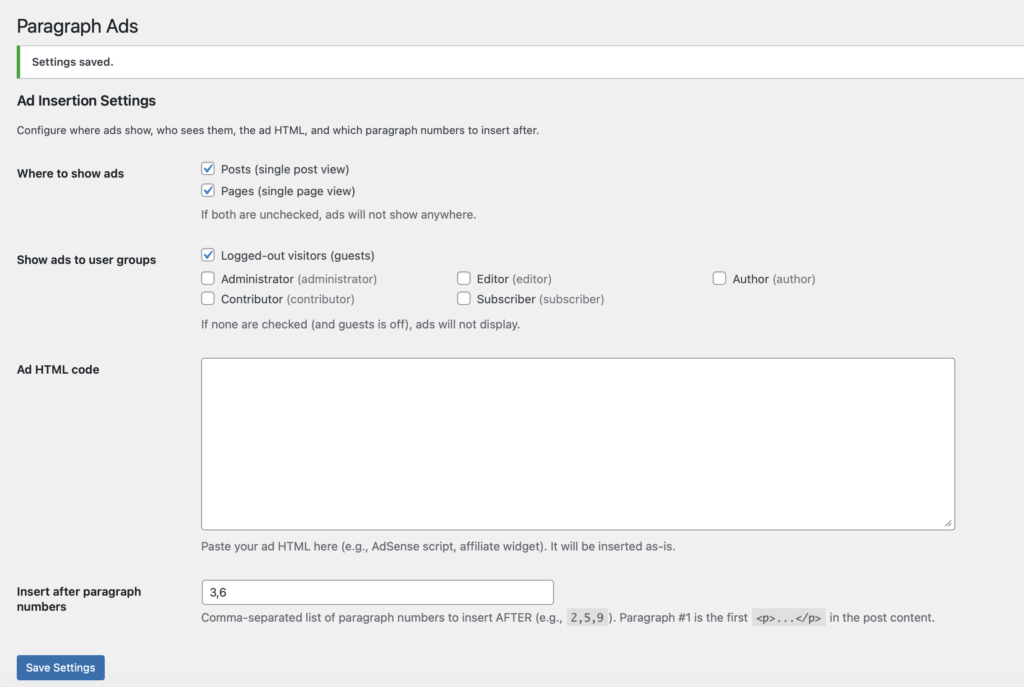
When looking for a plugin to accomplish this, I found most of them were massive “Ad Manager” style plugins that had tons of bloat, premium feature upsells, and unnecessary complexity. So I built a very simple WordPress plugin to do that. No bloat, no premium edition, no extra features – it just inserts ads between paragraphs.
The WordPress Paragraph Ads Inserter plugin inserts your ad HTML after specific paragraph numbers in your content without you touching individual posts. It works cleanly with both the Classic Editor and the Block Editor because it operates on the final rendered content WordPress outputs.
Features
- Insert ads after multiple paragraph numbers of your choice.
- Supports Classic Editor and Block Editor
- Target Posts, Pages, or both
- Role-based visibility: show ads to guests and/or selected user roles
- Paste any HTML ad code (AdSense, affiliate widgets, sponsors)
Install
- Download the plugin from my GitHub page.
- Activate Paragraph Ads Inserter in WP Admin → Plugins
- Configure in WP Admin → Settings → Paragraph Ads
Usage
- Enter paragraph numbers as a comma-separated list (example:
2,5,9) - Ads are inserted after the Nth closing
</p>in the rendered post content.
Notes
- Only injects on singular views (single post/page) and only where enabled in settings.
- If content contains no
<p>tags, nothing is inserted.
FAQ
Does this plugin auto-update?
No – this plugin is not submitted to the wordpress.org plugin repository and so it does not auto-update. There is no telemetry or call back system. You will need to check my blog or GitHub for occasional updates.
Can I do X? Will you add feature Y?
Probably, and no, in that order.
I created this plugin for my own use and I’m sharing it in case it helps someone else. I’m not looking to make money on it or add 50 different features.
I need help!
Leave a comment below. This plugin is offered on a best-effort basis but I’ll do my best to get back to you.
Changelog
- 01/25/2026: Version 1.0.0 published.